Understanding Credits
Product Classifier uses a credit-based system to track usage across all subscription plans. Understanding how credits work helps you monitor consumption, plan capacity, and avoid service interruptions.
What Are Credits?
Credits are the unit of measurement for Product Classifier usage. Every time you classify a product—whether through the Playground, API, or MCP server—you consume credits from your account balance.
Credit Consumption
One classification = one credit
Each classification request consumes exactly one credit, regardless of:
- Which taxonomy you use (Shopify or Google)
- Whether a category is found
- The confidence level of the result
- Whether you use custom instructions
- Whether you enable leaf-only mode or top-ranked fallback
When Credits Are Consumed
Credits are deducted when the classification pipeline runs successfully, even if no category is found. The system still analyzes your product description, generates candidates, and attempts AI selection—all of which consume computational resources.
Example scenarios:
- Classification returns a category (green indicator) → 1 credit consumed
- Classification returns no category (black indicator) → 1 credit consumed
- Top-ranked fallback used (yellow indicator) → 1 credit consumed
When Credits Are NOT Consumed
Credits are not deducted when technical errors prevent the classification request from being processed:
- HTTP 401 (Unauthorized) - Invalid or missing API key
- HTTP 403 (Forbidden) - Insufficient credits (request rejected before processing)
- HTTP 429 (Too Many Requests) - Rate limit exceeded
- HTTP 500 (Internal Server Error) - Server-side error
These errors prevent the classification pipeline from running, so no resources are consumed and no credits are deducted.
For complete details on error codes and when they occur, see Error Handling and Response Codes.
Types of Credits
Your credit balance consists of two types of credits that work together to provide flexibility in how you manage usage.
Monthly Credits
Monthly credits are included with your subscription plan and renew at the start of each billing cycle.
Key characteristics:
- Included with your plan - Every subscription tier comes with a predetermined monthly credit allocation
- Renewable - Credits refresh at the start of each billing cycle
- Non-cumulative - Unused monthly credits are lost when the new cycle begins
- Plan-dependent - Different plans include different monthly allocations
Example:
If you’re on the Starter plan with 3,000 monthly credits and only use 2,500 credits in a billing cycle, the remaining 500 credits are lost when your new cycle starts. You’ll receive a fresh 3,000 credits for the new month.
Auto-Recharge Credits
Auto-recharge credits (also called “purchased credits” or “top-up credits”) are credits you purchase separately from your subscription plan.
Key characteristics:
- Purchased in bulk - Buy credits in packages at various price points
- Persistent - Remain in your balance until used—they don’t expire or renew
- Zero by default - Your auto-recharge balance starts at zero
- Optional - Not required; only purchase when you need additional capacity
Example:
You purchase a 5,000-credit top-up package. These credits remain in your balance across multiple billing cycles until you consume them through classifications.
How Credits Are Used
When you make a classification request, Product Classifier consumes credits in this order:
- Monthly credits first (if available)
- Auto-recharge credits second (if monthly credits are exhausted)
This prioritization ensures you use your renewable monthly allocation before tapping into your purchased credit reserve.
Example credit consumption:
Your plan includes 3,000 monthly credits, and you have 2,000 auto-recharge credits from a previous purchase.
- Request 1-3,000: Uses monthly credits → Monthly: 0 remaining, Auto-recharge: 2,000 remaining
- Request 3,001-5,000: Uses auto-recharge credits → Monthly: 0 remaining, Auto-recharge: 0 remaining
When your next billing cycle starts, your monthly credits renew to 3,000, but your auto-recharge balance remains at 0 (since you used them all).
Viewing Your Credit Balance
Monitor your credit balance and usage in the Account / Billing page of your dashboard.
Credit Balance Section
The Credit Balance section displays four key pieces of information:
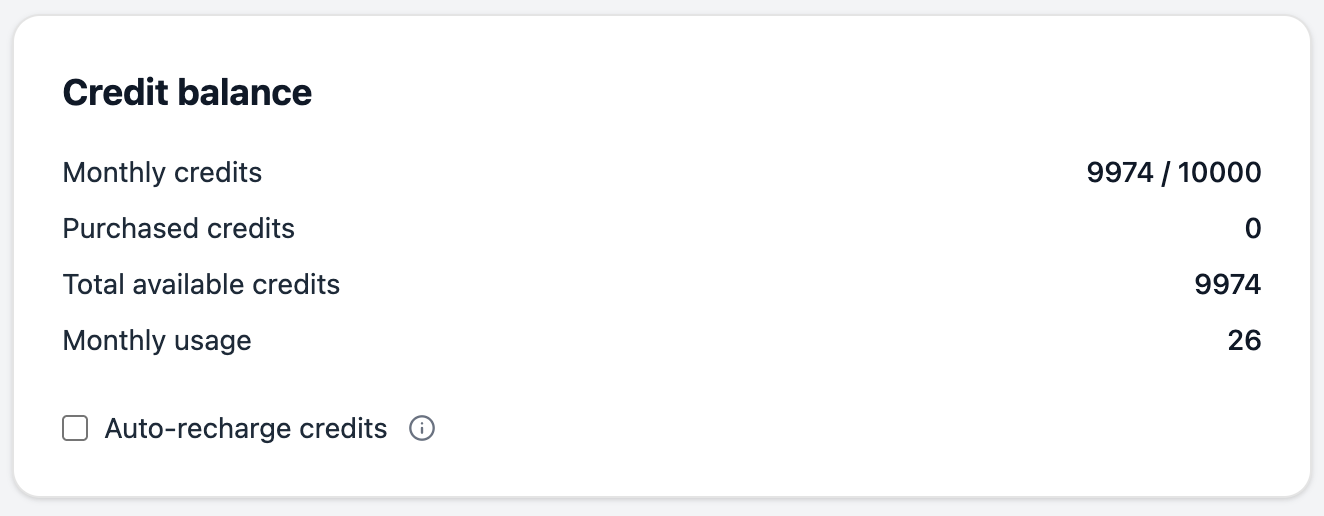
Monthly credits (available / monthly limit)
Shows how many monthly credits you have left in the current billing cycle and your plan’s total monthly allocation.
Example: 1,750 / 3,000 means you have 1,750 monthly credits remaining out of your plan’s 3,000-credit monthly allocation.
Purchased credits
Shows your auto-recharge credit balance—credits you’ve purchased separately that persist across billing cycles.
Example: 500 means you have 500 auto-recharge credits available.
Total available credits (monthly available + purchased credits)
The sum of your remaining monthly credits and auto-recharge credits. This is the total number of classifications you can make before running out.
Example: 2,250 (1,750 monthly + 500 auto-recharge) means you can make 2,250 more classifications before exhausting your balance.
Monthly usage
The total number of credits you’ve consumed in the current billing cycle. This resets to zero at the start of each new cycle.
Example: 1,250 means you’ve made 1,250 classifications so far this month.
Understanding Your Balance at a Glance
Use these metrics together to understand your usage patterns:
High monthly usage with low remaining credits suggests you may need:
- A plan upgrade with higher monthly allocation
- To purchase auto-recharge credits
- To set up automatic credit purchases
Consistently unused monthly credits suggests you might:
- Be on a plan that’s too large for your needs
- Be able to downgrade to a lower tier
Growing auto-recharge balance indicates:
- You’ve purchased more credits than you’re using
- You have a good buffer for unexpected usage spikes
What Happens When Credits Run Out
When your credit balance reaches zero—both monthly and auto-recharge credits exhausted—the API returns an HTTP 403 (Forbidden) error with the message: Insufficient credits.
No classification occurs, and you cannot make additional requests until you:
- Wait for monthly credit renewal - Your monthly credits replenish at the start of your next billing cycle
- Purchase auto-recharge credits - Buy credits immediately to continue classifying
- Upgrade your plan - Move to a higher tier with a larger monthly credit allocation
For detailed information about setting up automatic credit purchases to prevent service interruptions, see Auto-Recharge Setup.
Trial Account Credits
Trial accounts receive 50 credits to test the service. These trial credits:
- Are available for 7 days
- Work identically to monthly credits
- Do not renew
- Are consumed using the same rules as paid accounts
After exhausting trial credits or when the trial period ends, you must choose a paid subscription plan to continue using the service.
Monitoring Usage Patterns
Regularly review your credit balance to understand usage patterns and plan accordingly:
Daily Monitoring
Check your credit balance if you:
- Run bulk classification operations
- Import large product catalogs
- Notice unexpected usage spikes
Weekly Monitoring
Review weekly consumption to:
- Track trends over time
- Identify seasonal patterns
- Adjust your plan or auto-recharge settings
Monthly Analysis
At the end of each billing cycle, analyze:
- Total monthly usage vs. your plan’s allocation
- How many unused monthly credits you lost
- Whether your plan size matches your needs
- Auto-recharge credit consumption
Credits vs. Rate Limits
Credits and rate limits are different concepts that both affect your API usage:
Credits control your total volume - how many classifications you can perform based on your subscription plan.
Rate limits control your request frequency - how many requests you can make within specific time windows (per minute, per hour, per day).
You might hit rate limits even if you have credits remaining, or exhaust credits without hitting rate limits. Both must be managed for optimal API usage.
For complete details on rate limits, default values, and requesting increases, see Rate Limits & Usage Quotas.
Next Steps
Now that you understand how credits work:
- Auto-Recharge Setup - Configure automatic credit purchases to prevent interruptions
- Pricing and Plans Explained - Compare plans and choose the right monthly credit allocation
- Rate Limits & Usage Quotas - Understand request frequency limits alongside credit consumption
- Error Handling and Response Codes - Learn how to handle insufficient credit errors in your application